Searching for data within IDS is extremely simple. We customize each search screen to allow you to search
your data by whatever criteria best suites your needs.
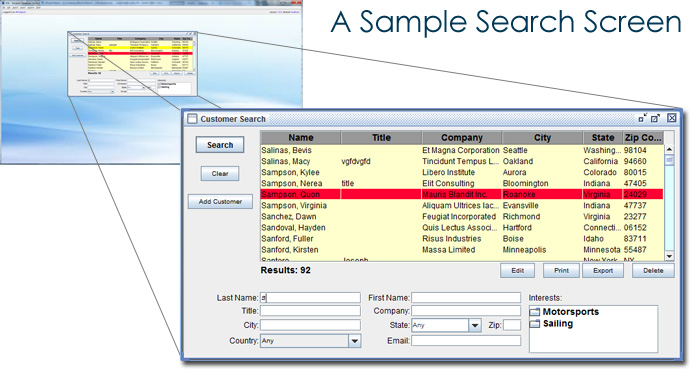
If you are searching through your database of widgets, you may want to search by the name of the widget,
or by its type, or by where it is made, or by several other different criteria. Once we have determined
how you would like to be able to search for your data, each search screen is then created with those
options included.
The search screen also includes two data maintenance options, delete and transfer. The delete option
allows you to delete an item from your database. In consultation with you we will determine what
parameters must be met for an item to be deleted. This prevents an item that may be associated with
another part of your database from being accidentally deleted. Even once an item has been deleted
there is a safety net feature incorporated into IDS which allows you to recover deleted items.
The transfer option is extremely useful if you have a large database that may contain duplicate records.
If two or more duplicate records are found, this option will let you transfer all important information
from one record to the other. After the transfer process you will have one record that contains all
the information on your data item, allowing you to delete the other duplicate record.
In addition to searching your large main data components, you can also search from smaller 'list' items.
These could include a list of widget types, for example. You can easily view and edit all of your list
items, which are then used throughout the rest of your database and IDS application.
Next >>
Why IDS?
•
IDS - Growing With You
•
IDS & Automation
•
IDS & Data Security
•
IDS - Desktop vs Browser Client
Features Overview:
•
IDS Desktop
•
Customized data search screens
•
Customized data editing screens
•
Customized reporting tools
•
Customized data import & export tools
•
Bulk emailing
•
Customizable menus per user
•
Update multiple databases simultaneously
•
Website & mobile integration
Technical Overview:
•
Java based (runs on Windows and Mac)
•
Integrates with MS SQL Server or MySQL databases
•
XML & JDBC technology
