Editing and reviewing of the data contained within your database is extremely easy with IDS. The editing
screens are designed around your data. This allows your IDS system to display the data in the most user
friendly way possible.
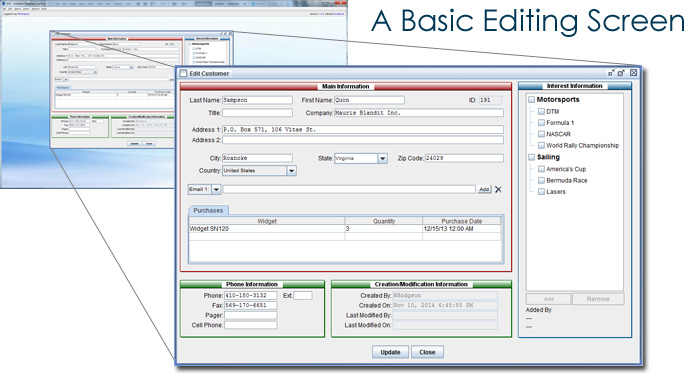
There are two types of editing options within IDS. The first is a full featured editing screen. This would
be used for your main data, such as your customers or your products. Each screen would allow you to view
and modify all the data associated with the particular item. Additionally, a record of all changes is maintained.
This searchable audit trail can help in case any data is accidentally or incorrectly changed.
The second type of editing option is a list. As an example, if you create three different types of widgets,
you would want to maintain a list of these three widget types. Then when you create a widget you would assign
it to one of the three widget types. If you create a new type of widget in the future, you would simply add that
type of widget to the list of widget types, making it available to be used in the main widget editing screen,
as well as in the widget search screen.
The above is an example of a basic editing screen. It has been kept simple in order to provide a general overview
of the editing screen concept. Your screens may be far more complex if necessary.
Next >>
Why IDS?
•
IDS - Growing With You
•
IDS & Automation
•
IDS & Data Security
•
IDS - Desktop vs Browser Client
Features Overview:
•
IDS Desktop
•
Customized data search screens
•
Customized data editing screens
•
Customized reporting tools
•
Customized data import & export tools
•
Bulk emailing
•
Customizable menus per user
•
Update multiple databases simultaneously
•
Website & mobile integration
Technical Overview:
•
Java based (runs on Windows and Mac)
•
Integrates with MS SQL Server or MySQL databases
•
XML & JDBC technology
