The IDS application provides the user with a multi-windowed environment. Each of these windows is displayed
within a "desktop" window. This allows you to view multiple search, data or other screen types simultaneously.
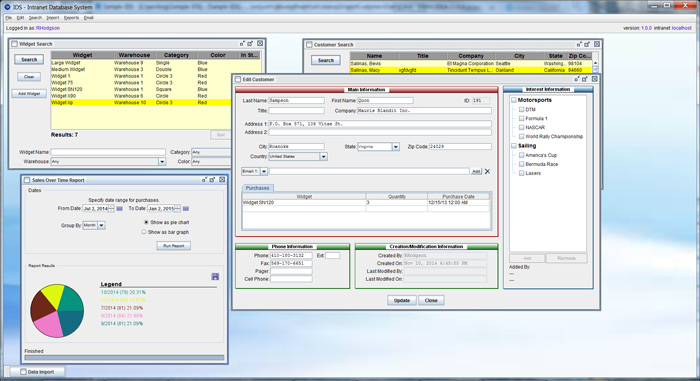
The desktop window displays all the user's menus, as well as other important information. This includes
the name of the currently logged in user, the version of IDS being run and the addresses of the servers
with which IDS is in communication.
In addition, several optional floating panels are also displayed within the desktop. These monitor IDS systems
providing information on memory usage, database transactions, and server status.
The desktop's background can be customized with your company's logo, or other image, or the user's name.
Next >>
Why IDS?
•
IDS - Growing With You
•
IDS & Automation
•
IDS & Data Security
•
IDS - Desktop vs Browser Client
Features Overview:
•
IDS Desktop
•
Customized data search screens
•
Customized data editing screens
•
Customized reporting tools
•
Customized data import & export tools
•
Bulk emailing
•
Customizable menus per user
•
Update multiple databases simultaneously
•
Website & mobile integration
Technical Overview:
•
Java based (runs on Windows and Mac)
•
Integrates with MS SQL Server or MySQL databases
•
XML & JDBC technology
